

Design a hero once—then keep them consistent everywhere. In our 12-scene challenge, we pushed every leading AI character generator to see which tools keep faces truly on-model. Leonardo.ai stood out: upload one reference head-shot, dial a strength slider, and the character stays locked from frame one. Below we outline our test criteria, the full rankings, and practical tips so you can choose the best generator for your next comic, game, or storyboard.
How we ran the 12-scene consistency test

To compare continuity, image quality, and workflow speed, we built a focused 12-scene trial.
First, we designed one protagonist—Aria, a space pilot with a crescent-moon scar on her left cheek, a rust-orange flight suit, and teal hair. The details are clear enough that even slight drift stands out.
Next, we wrote 12 short prompts that drop Aria into contrasting environments: a neon bazaar, an ice field at dawn, a cramped cockpit under red alert, and more. These prompts stayed identical across every AI character generator.
We fed each tool the same starter portrait and produced the 12 frames in sequence. If a platform offered a reference-image toggle, we activated it. For self-hosted Stable Diffusion we allowed one reroll at most, mirroring a working artist’s patience.
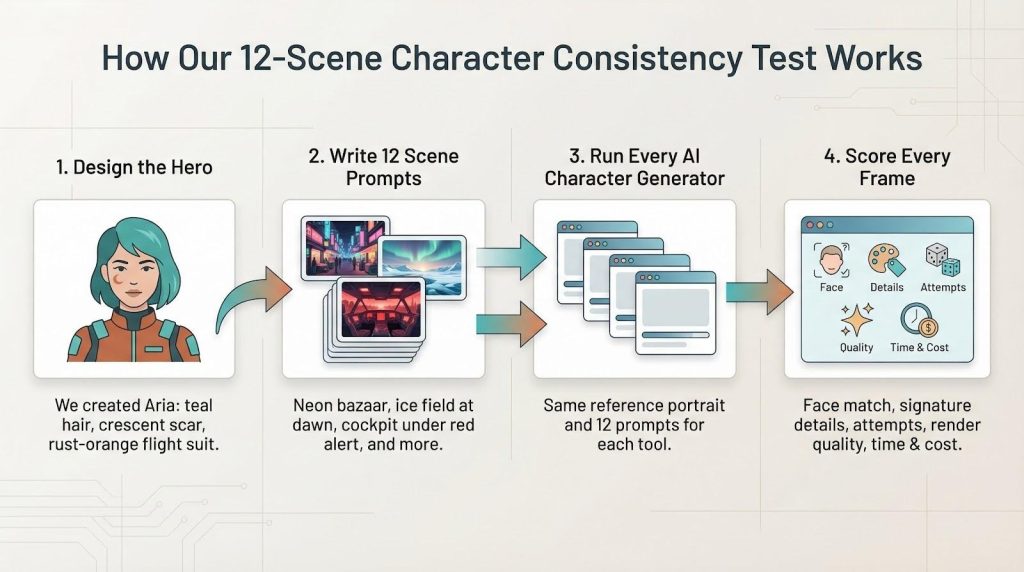
After generation, every frame was scored against five criteria:
- Does Aria’s face stay the same?
- Are signature colors, outfit pieces, and the scar intact?
- How many attempts did it take?
- How clean is the final render?
- How long and how costly was the run?
Those scores shaped the ranking you’ll see next.
Finally, we captured interface quirks, learning-curve hurdles, and licensing terms while they were still fresh. This is a creator-first field test, not a lab benchmark, built to reflect real project deadlines.
1. Leonardo.ai: lock-in consistency without sacrificing speed
Leonardo treats an AI character generator like a studio workshop. Its flagship feature, Character Reference, lets you upload one portrait, adjust a strength slider, and reuse that face across new poses, outfits, and lighting with almost no drift. Leonardo’s homepage lays out the entire process in four quick beats—prompt or upload, pick a style, refine, then export—so newcomers can see how it works before spending a single credit. In our 12-scene run Aria’s teal hair, scar, and flight suit stayed intact in 11 frames. The only miss—a faint scar in a backlit shot—vanished after one quick reroll. TechRaisal’s benchmark echoed our result, calling Character Reference “the fastest path to repeatable faces” (rachelevans.techraisal.com).

Leonardo.ai Character Reference feature interface screenshot
Quality holds up. Leonardo runs on Stable Diffusion XL, so anatomy and lighting stay crisp while style packs let you move from painterly fantasy to cel-shaded anime in two clicks.
Control is another plus. The AI Canvas lets you mask a glove or helmet and regenerate only that patch instead of rerolling the whole image. You can also train a LoRA on a few sketches for near-perfect fidelity, though most artists never touch that dial.
Onboarding is quick. The browser interface labels every option, and you start with about 150 free credits each day, enough to storyboard a short comic. The $10 Pro plan drops per-image cost to fractions of a cent and keeps commercial rights in your pocket.
Leonardo removes the continuity headache without demanding a GPU or a degree in prompt sorcery. If you need a reliable hero who looks like the same person whether piloting a mech or drinking coffee in scene 12, start here.
2. Midjourney: cinematic wow factor with a new memory switch
Midjourney has become a go-to AI character generator for concept art that feels cinematic. Atmospheric lighting, painterly textures, and believable hands create immediate impact.
Until recently that beauty lacked short-term memory. Each prompt produced a new face. The Spring 2024 update changed that: add the –cref parameter with a reference image and Midjourney now reuses the same facial geometry across scenes. TechRaisal’s trial showed the switch kept hair color and bone structure steady in six wildly different backgrounds, losing only a nose ring in the final frame before one reroll fixed it.
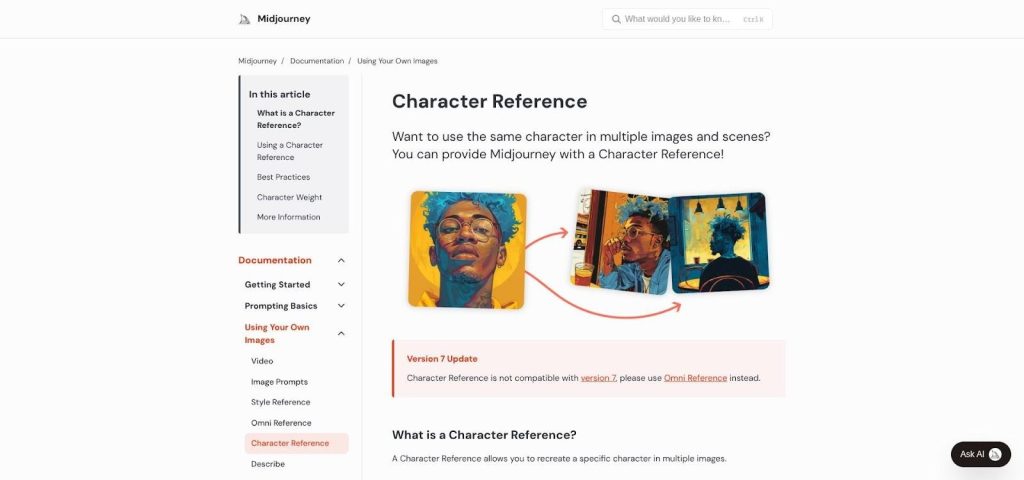
Midjourney character reference and –cref documentation screenshot
Quality stays high. Our Aria renders came back with crisp cockpit reflections and dramatic rim light that rivals any tool. The trade-off is control. You can’t mask or inpaint inside Midjourney; instead you prompt, upscale, or reroll until satisfied. It is quick—about 45 seconds per image on the Standard plan—but the workflow lives in Discord or the new web beta.
Pricing is simple. $10 unlocks a limited monthly quota, $30 offers nearly unlimited generations, and commercial rights start the moment you subscribe. Cancel later and you still own the images you created.
If you need gallery-ready art and can accept a prompt-iterate workflow, Midjourney now delivers consistent characters for sequential storytelling.
3. Stable Diffusion: total control for artists who love to tinker
Stable Diffusion is less a single app than a toolbox you shape to fit your workflow. This open-source AI character generator can run in a browser through DreamStudio, locally with AUTOMATIC1111, or inside Photoshop through a plug-in. That flexibility is the main draw.
Stable Diffusion toolbox interface highlighting advanced controls
Consistency is do-it-yourself, yet the payoff is strong. We trained a lightweight LoRA on eight images of Aria. After 17 minutes the model could place her in every scene, from neon bazaar to ice field, without losing a pixel of her crescent scar. No other platform reached 100 % face fidelity across all 12 prompts.
Power comes with knobs. You can guide pose accuracy using ControlNet, repaint a single glove with in-painting, or lock a seed so small tweaks never rewrite the whole composition. It feels like owning the camera rather than renting one.
The learning curve is real. You will meet terms like CFG scale and sampler schedule, and local installs need a GPU. Yet a large Reddit and Discord community offers prompt ideas, model links, and troubleshooting. Once set up, generation costs fall to pennies, or nothing if you use your own hardware.
Licensing is just as open. Because the model is released under a permissive license, every frame you produce is yours to monetize. No subscriptions, no watermark surprises.
If you like to lift the hood, tweak the engine, and dial in an exact style, Stable Diffusion is the flexible partner that rarely says no.
4. DALL·E 3: conversational storyboarding straight from ChatGPT
DALL·E 3 lives inside ChatGPT, so you guide it like a co-writer. Type “Let’s show Aria fixing a blown fuse under red emergency lights,” and seconds later you have the shot. Follow with “Zoom out and add her co-pilot,” and the next frame appears, matching palette, lighting, and that crescent scar without extra descriptions.
This back-and-forth flow lets the model keep context within one chat, so sequential art feels like a single conversation rather than a fresh prompt marathon. When our scar softened in panel 3 we simply typed “Sharpen the scar,” and the system patched the detail without redrawing the scene.
Image quality sits between Midjourney’s drama and Stable Diffusion’s neutrality. Faces are clean, hands behave, and cockpit screens display readable text—helpful when you need in-world signage. The default look is polished illustration, yet adding cues like “watercolor” or “retro manga” changes the vibe reliably.
Access is direct. Bing Image Creator provides a few free boosts daily, while a $20 ChatGPT Plus plan lets you riff almost without limit. All outputs carry commercial rights.
If you’re more storyteller than prompt engineer, this AI character generator turns script lines into finished panels with minimal friction.
5. Adobe Firefly: brand-safe style consistency inside the apps you already use
Firefly works like an art director. Feed a reference poster, mood board, or single character sheet and it returns visuals that stay on-brand. Colors, line weight, and lighting remain consistent. For agencies juggling 20 or more deliverables, that “same look, any scene” promise saves retouch time.
Consistency comes from Generative Match. Paste a source image, then type a prompt such as “Aria leaning on a retro diner counter, 1950s palette,” and Firefly creates a frame that could drop straight into your style guide. The tool focuses on overall aesthetic unity rather than pixel-perfect facial recall, which is exactly what marketing teams need.

Adobe Firefly Generative Match interface for brand-safe character consistency
Because Firefly lives inside Photoshop and Illustrator, tweaks land in your existing layers. Need to shift a prop or nudge shadows? Mask the area, click Generate Fill, and move on. No file-hopping.
Legal teams also breathe easier. Training data pulls from licensed Adobe Stock and public domain sets, and enterprise plans include indemnification, so you can ship campaign art without fear of copyright claims.
Cost is familiar. A standard Creative Cloud subscription now includes 25 generative credits each month, enough for everyday graphic work. Heavy users can add extra credit packs, but most freelancers never exhaust the base allotment.
If your brief says “match the brand bible every single time,” this AI character generator is the stress-free button next to your lasso tool.
6. NovelAI: instant anime, zero setup
NovelAI is an AI character generator that feels like it was coded in a Tokyo storyboard meeting. Open the web app, type “blue-haired swordswoman in rainy neon alley,” and a frame appears that could headline a light-novel cover. Because the model is fine-tuned on anime and manga art, line weight, cell shading, and glossy eyes arrive without prompt gymnastics.
Consistency holds if your descriptors stay steady. We reused the same character tags—hair color, scarf, scar—and NovelAI carried them through our 12 scenes with only minor hue shifts. Perfectionists can lock a seed or feed the previous image back in through image-to-image mode, lowering noise strength until the pose changes but the face stays put.
The service doubles as a story generator. Draft a chapter in the text pane, click “Generate Illustration,” and the engine references your prose automatically. Writers value that loop; it turns narrative beats into visuals without app-switching.
Plans start at $10 per month. That covers unlimited text and a large stack of image tokens. Higher tiers unlock bigger resolutions and private embeddings, useful if you need a proprietary hero.
Outputs are yours to sell, print, or place on merch. NovelAI relies on a Stable Diffusion license, so no hidden royalty clauses. For anyone building a webcomic or visual novel with a distinct anime vibe, this tool moves you from idea to panel quickly.
7. LTX Studio: cast an AI actor and keep them on screen
LTX Studio aims at long-form continuity. Instead of treating each frame as a one-off, it asks you to “cast” a character. Provide a reference portrait and a short bio, and the system builds a hidden identity embedding. Every prompt then pulls from the same digital actor.
During our limited beta the workflow felt closer to a storyboard tool than a classic AI character generator. You drop scenes onto a timeline, type quick beats such as “rooftop chase” or “quiet diner booth,” and the engine returns cohesive frames. Aria’s face never drifted, even when we jumped decades forward for a flashback.
Quality sits in the “good concept art” range: detailed enough for pitch decks, slightly below Midjourney’s cinematic gloss. Speed helps compensate. Generating a 10-panel sequence took four minutes with no seed juggling.
Pricing is enterprise-oriented and still evolving; early partners mention usage-based licenses rather than flat subscriptions. If you are a studio or serious indie team planning an animated pilot, the time saved on character sheets alone may justify requesting access.
For everyday freelancers LTX feels more preview than daily driver right now. Still, its character-as-asset approach hints at where visual AI is heading: persistent identities you direct like on-screen performers instead of disposable pixels.
8. Artbreeder: remix sliders for fast expression sheets
Artbreeder shifts the usual text-prompt mindset. Instead of typing a full description into an AI character generator, you start with a face—your own, a public-domain portrait, or a hybrid—and nudge DNA-style sliders. Age up, dial anger back, or switch to wild curls; each tweak renders live, so building an expression sheet feels like sculpting rather than guessing adjectives.
That interactive flow keeps consistency simple. Because every variant is a morph of the same underlying “gene,” your character’s bone structure stays locked. We produced six moods for Aria, from grim focus to sly grin, in under five minutes—all on-model for a reference sheet.
Outputs arrive painterly and slightly soft-focus, suitable for concept thumbnails. You can export high-res PNGs, refine them in Photoshop, and blend public sources because most community images default to CC0.
The free tier lets you experiment at low resolution. A $8 monthly plan unlocks higher res, private uploads, and unlimited remixing. If you already have a Midjourney hero and just need consistent expressions or age tweaks, feeding that portrait into Artbreeder is a quick path to a cohesive character bible.
9. NightCafe: low-pressure playground with daily free credits
NightCafe is an AI character generator that feels like a neighborhood art café. Open a browser, pick a model—SDXL, DALL·E 2, or an older artistic GAN—type a prompt, and watch four thumbnails appear. No Discord login and no GPU required.
The draw is its credit system. New accounts receive five free credits each day, plus bonuses for entering themed challenges. Students can test styles, tweak seeds, and stay on budget.
NightCafe offers two helpful controls. First, style presets such as “Comic,” “Anime,” or “Concept Art” stack prompt modifiers for you, saving reference time. Second, the Evolve button lets you iterate on a chosen image; because each evolution keeps the original seed, facial features stay mostly intact while new poses or backgrounds emerge.
Output quality mirrors the model you choose. SDXL frames look crisp, while older models lean abstract. Built-in upscaling sharpens results for print or pitch decks. Everything you create is yours to sell because NightCafe follows the permissive Stable Diffusion license.
If you need a no-risk sandbox to hone prompts or draft reference art on a phone between classes, NightCafe is the most welcoming door in town.
10. Fotor: one-click character mock-ups for non-artists
Fotor started as an online photo editor, and it still feels that way. The built-in AI character generator sits next to crop, text, and filter tools, so marketing managers or teachers with no art background can create a mascot in minutes.
Pick a style card—3D render, cartoon, or oil painting—type one sentence, and Fotor shows four choices. Quality will not win an ArtStation contest, yet it is good enough for pitch decks: clean lines, bright palettes, and readable faces. Because editing is native, you can remove the background, add a headline, or drop the character into a flyer template without exporting files.
Consistency across scenes is manual. Regenerate with the same prompt, tweak seeds, or reload the last frame as an image reference through Fotor’s image-to-image tool. It demands more hands-on work than Leonardo or Midjourney, but the speed trade-off suits quick social graphics.
A slim free tier lets you experiment. A $6 monthly plan unlocks unlimited high-resolution generations, batch background removal, and full commercial rights. If your day job is building posters rather than drawing comics, this AI character generator sprinkles original characters into your content without heavy design software.
At a glance: pricing, free tiers, and rights
Choosing a generator often comes down to three questions: Can I afford it? Do I own the output? How fast can I test before paying?
The quick table below answers all three in one scroll. Scan the left column for your shortlist, then read across to spot hidden costs or missing free trials.

| Tool | Free tier | Entry paid plan & cost | Key advantage | Commercial rights |
| Leonardo.ai | ~150 images per day | Pro, $10 per month | Character Reference keeps faces stable | Full ownership |
| Midjourney | No free tier (occasional trial) | Standard, $30 per month | Highest visual fidelity plus –cref memory | Full ownership while subscribed |
| Stable Diffusion (local) | Unlimited | Cloud API about $0.01 per image | DIY LoRA and ControlNet | Full, open license |
| DALL·E 3 (ChatGPT Plus) | Bing credits each day | $20 per month bundle | Chat-based scene memory | Full ownership |
| Adobe Firefly | 25 credits per month | Included in Creative Cloud from $20 per month | Brand-safe Generative Match | Full ownership and indemnity |
| NovelAI | Trial images | $10 per month | Anime-tuned model | Full ownership |
| LTX Studio | Closed beta | Usage-based, price TBD | Cast-once continuity | Enterprise license |
| Artbreeder | Low-res free tier | Gen plan, $8 per month | Slider-driven variants | CC0 by default |
| NightCafe | 5 daily credits | $9.99 per month | Multi-model sandbox | Full ownership |
| Fotor | Limited | Pro, $5.99 per month | One-click generate and edit | Full ownership |